
5.4. Authentication flow#
This section describes the flow during user authentication in Nubus for Kubernetes using OpenID Connect. It helps you make informed decisions about scaling your Nubus for Kubernetes environment.
This page helps with debugging and problem-solving around the authentication process. It doesn’t consider the sign-in to the UDM HTTP REST API.
The audience includes operators who need to scale the capacity of Nubus for Kubernetes, architects, and consultants.
To follow along in this section, you need to be familiar with the OpenID Connect protocol. No knowledge about Kubernetes specific terms is necessary.
See also
- Scalability
for information about the scalability of Nubus for Kubernetes.
5.4.1. Components involved in authentication flow#
The authentication flow in Nubus for Kubernetes involves the following components:
User’s web browser
Portal Frontend
Portal Server
UMC Server
Keycloak
Directory Service
Fig. 5.13 shows the components, their relationship to each other, and to which functional component they belong.
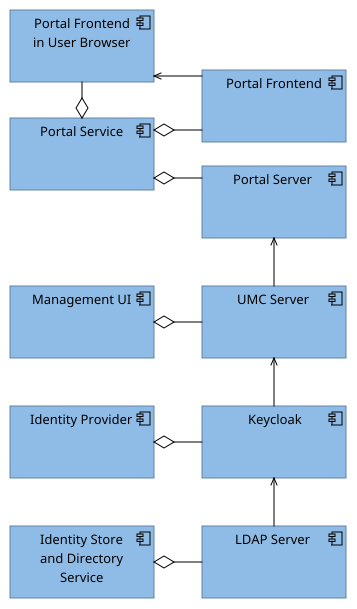
Fig. 5.13 Involved application components in authentication flow#
See also
For more information about the involved components, see their respective components sections:
5.4.2. Flow#
This section describes the user authentication flow for the Portal Service in Nubus for Kubernetes using OpenID Connect. Authentication begins at the Univention Portal. For information about accessing the portal, see Open the Portal in Univention Nubus for Kubernetes - Operation Manual [1]. The following steps explain the flow from when the user clicks the Login tile to the user having a user session:
On the Portal Frontend, the Login tile points to
/univention/oidcin the UMC Server.The UMC Server redirects the user to Keycloak.
Keycloak presents the sign-in form to the user in their web browser.
The user enters their credentials and sends them to Keycloak for verification.
Keycloak validates the user credentials with the LDAP Server storage backend.
On verification success, Keycloak returns an authorization code and redirects the user to the UMC Server with the authorization code. The UMC Server exchanges the authorization code for actual tokens.
It’s the behavior of the regular Authorization Code Flow in OpenID Connect Core 1.0 incorporating errata set 2 [9]. For details, see the reference later on the page.
Based on the received token, the UMC Server generates a user session and redirects the user back to the Portal Frontend.
Important
Only the UMC Server instance that generated the user session knows about it. Any requests in the context of the user session need to use that UMC Server instance. Nubus for Kubernetes has proper configuration to ensure the communication.
A UMC Server instance restart loses the user sessions of that instance. For information about UMC Server instance restarts, see Restart UMC Server pod in Univention Nubus for Kubernetes - Operation Manual [1].
The following list provides context information about the authentication flow:
- Flow artifacts
The authentication flow generates the following artifacts:
User session in Keycloak
User session in UMC Server
- Sign-in error handling
If the user provides wrong credentials, the sign-in form from Keycloak appears again with an error message.
- Session refresh
As long as a browser tab has the Portal Frontend opened, the following happens continuously:
The portal triggers a session refresh with the UMC Server to keep the user session alive.
The UMC Server initiates an OpenID Connect token refresh with Keycloak to refresh the user session.
- Back channel sign-out
When the user session times out, or when the user actively signs out of an application linked to Keycloak's user session, Keycloak informs the UMC Server to end the user session. The UMC Server informs the portal about the sign-out.
The portal object in Nubus for Kubernetes has a configuration for requiring a sign-in or presenting an anonymous portal. For more information, see Require sign-in to see portal entries in Univention Nubus - Nubus Manual [7].
- Keycloak Flow
The Authorization Code Flow in Keycloak has the configuration for the outlined authentication flow.
See also
- Authentication using the Authorization Code Flow
in OpenID Connect Core 1.0 incorporating errata set 2 [9] for more information about the authorization flow in OpenID Connect.