
3.8. Domain replication with Listener and Notifier#
The Univention Directory Listener and Notifier mechanism replicates directory data within a Nubus for UCS domain and consists of two services.
The Univention Directory Listener service runs on all UCS systems.
On the Primary Directory Node, and on any existing Backup Directory Node systems, the Univention Directory Notifier service monitors changes in the LDAP directory and distributes those changes to the Univention Directory Listener services on the other Nubus for UCS systems.
As Fig. 3.4 shows, the active Univention Directory Listener instances in the domain connect to a Univention Directory Notifier service. All other LDAP servers in the domain are read-only replicas. If an LDAP change occurs on the Primary Directory Node, the Univention Directory Notifier registers the change and notifies the listener instances.
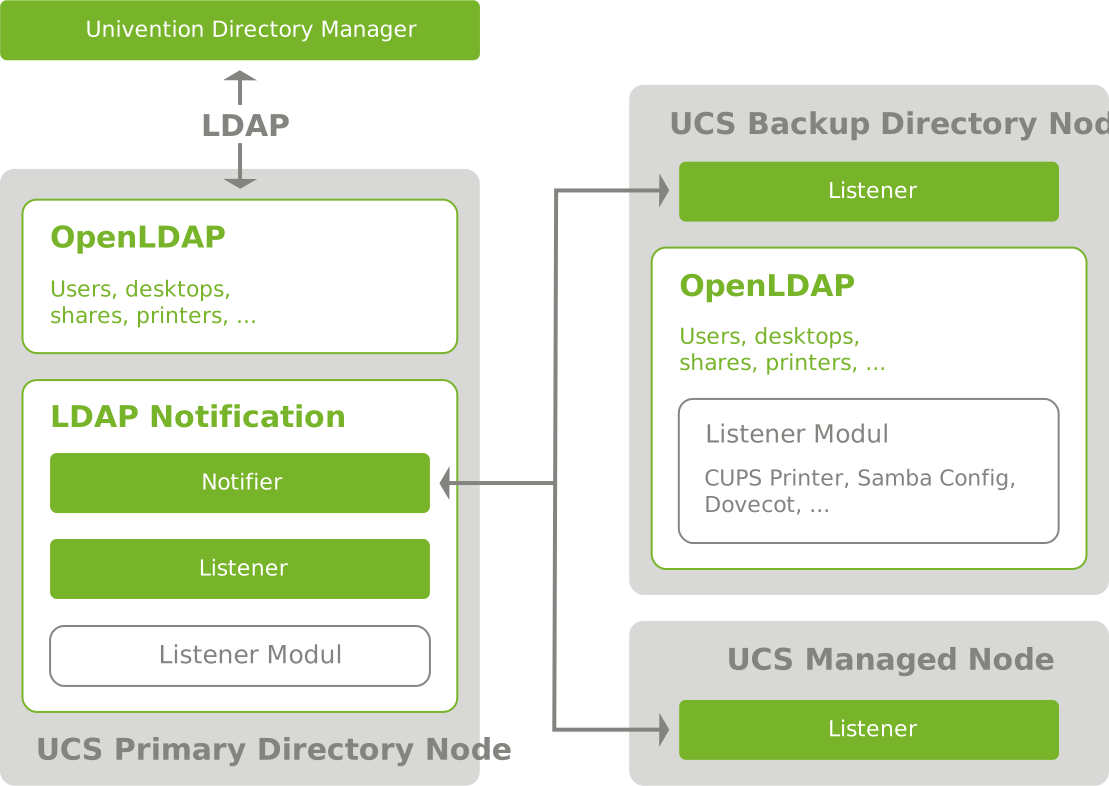
Fig. 3.4 Listener and Notifier mechanism#
3.8.1. Listener modules#
Each Listener instance uses several listener modules. Installed applications provide these modules. For example, the print server package includes listener modules that generate the CUPS configuration.
Listener modules communicate domain changes to services that aren’t compatible with LDAP.
The print server CUPS demonstrates this:
CUPS reads printer definitions from /etc/cups/printers.conf, not from LDAP.
When you save a printer in the Printer management module,
Nubus for UCS stores it in the LDAP directory.
The Univention Directory Listener module cups-printers detects this change
and adds, modifies, or deletes the corresponding entry in /etc/cups/printers.conf
based on the data in LDAP.
For more information about setting up and developing listener modules, see Univention Developer Reference [6].
3.8.2. Transaction-based replication#
One of the built-in listener modules also performs LDAP replication.
If the target LDAP server isn’t accessible,
the system temporarily stores the LDAP changes in /var/lib/univention-directory-replication/failed.ldif.
The system automatically transfers the file contents to LDAP
when the LDAP server becomes available again.
The Listener and Notifier mechanism is transaction-based. The Primary Directory Node increments the transaction ID for every LDAP change. A Listener instance that has missed several transactions, for example, because you turned it off, automatically requests the missing transactions after the connection becomes available again until its local transaction ID matches the one on the Primary Directory Node.
3.8.3. Listener and Notifier troubleshooting#
When replication doesn’t work as expected, the Listener and Notifier services provide diagnostic information through log files and transaction IDs. The following sections guide you through examining this data and resolving common issues.
3.8.3.1. Read log files and set debug levels#
The Listener and all listener modules write status messages to /var/log/univention/listener.log.
You can set the log detail level
with the UCR variable listener/debug/level.
The Notifier service writes status messages to /var/log/univention/notifier.log.
You can set the debug level
with notifier/debug/level.
3.8.3.2. Identify replication problems#
Under normal load with no network problems, replication from management modules to a Replica Directory Node is nearly instant. To verify replication is complete, compare the transaction IDs of the listener and notifier services.
On the Primary Directory Node, the Notifier writes all transactions to
/var/lib/univention-ldap/notify/transaction, in order, as shown in Listing 3.13.root@primary:~# tail -1 /var/lib/univention-ldap/notify/transaction 836 cn=replica3,cn=dc,cn=computers,dc=firma,dc=de m
The Listener stores the last received transaction ID in
/var/lib/univention-directory-listener/notifier_id, as shown in Listing 3.14.root@replica1:~# cat /var/lib/univention-directory-listener/notifier_id 836
The Nagios service UNIVENTION_REPLICATION can also perform this check automatically,
see Preconfigured Nagios checks in Univention Corporate Server - Manual for users and administrators [5].
3.8.3.3. Reinitialize listener modules#
If a listener module has problems,
you can reinitialize it.
Reinitialization causes the listener module to process all LDAP objects it works with again.
Pass the listener module name as an argument to the reinitialization command.
The installed listener modules are in
/var/lib/univention-directory-listener/handlers/.
For example,
to reinitialize the cups-printers module, run the command in Listing 3.15.
$ univention-directory-listener-ctrl resync cups-printers
Warning
Reinitialization removes internal state from the listener module and can’t be undone. Back up the listener state before reinitialization if you need to preserve it.