
2.5. Deployment view#
This section provides a deployment views for the functional components of Nubus for Kubernetes.
You need to know the concept of pods and jobs in Kubernetes and what a Helm Chart is. Pods are the smallest deployable units of computing that you can create and manage. A job creates one or more pods and continues to retry running the pods until a specified number of them successfully ends.
The deployment view of Nubus consists of several figures, because one single figure would contain too many elements and would be hard to read. Each component has its own deployment view. All views include Univention Nubus for Kubernetes.
The views follow the same pattern. A container registry stores a Helm Chart, and a Helm Chart references Docker images in a container registry. The Helm Chart and Docker images define a pod or job in the Kubernetes cluster. A pod or job runs the software for a functional component of Nubus for Kubernetes.
See also
- Pods | Kubernetes
for more information about pods, what they are and how to work with them.
- Jobs | Kubernetes
for more information about jobs and their role in workload management.
- Helm | Charts
for more information about Helm Charts.
Information about architecture views
2.5.1. Registries for Helm Charts and images#
Fig. 2.26 shows the container registries that provide Helm Charts and images for Nubus.
Most Helm Charts come from artifacts.software-univention.de and
docker.io.
Most images come from artifacts.software-univention.de and docker.software-univention.de, both operated by Univention.
Some artifacts come from docker.io.
The deployment views show which registry provides the respective Helm Charts and images.
When you install Nubus for Kubernetes, Helm loads the Charts and the images from these registry locations.
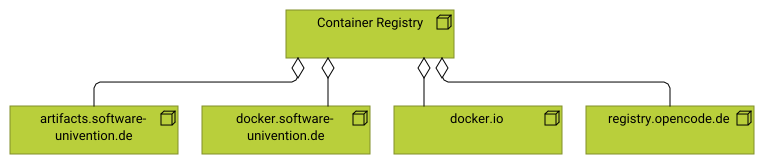
Fig. 2.26 Architecture view of the container registries that Nubus uses#
See also
- Deployment in Univention Nubus for Kubernetes - Operation Manual [1]
for more information about requirements and how to install Nubus for Kubernetes.
2.5.2. Authorization Service#
Fig. 2.27 shows the deployment view for the Authorization Service. For a description of the Guardian, refer to Authorization Service
- Helm Charts
guardianfromartifacts.software-univention.de
- Images
From the registry
docker.software-univention.de:guardian-authorization-api-authorization-apiguardian-management-api-management-apiguardian-management-ui-management-uiguardian-authorization-api-opa
From the registry
registry.opencode.de:keycloak-bootstrap
- Jobs:
guardian-provisioning- Pods
guardian-authorization-apiguardian-management-apiguardian-management-uiguardian-open-policy-agent
The pods run the respective components that make up the Authorization Service functional component.
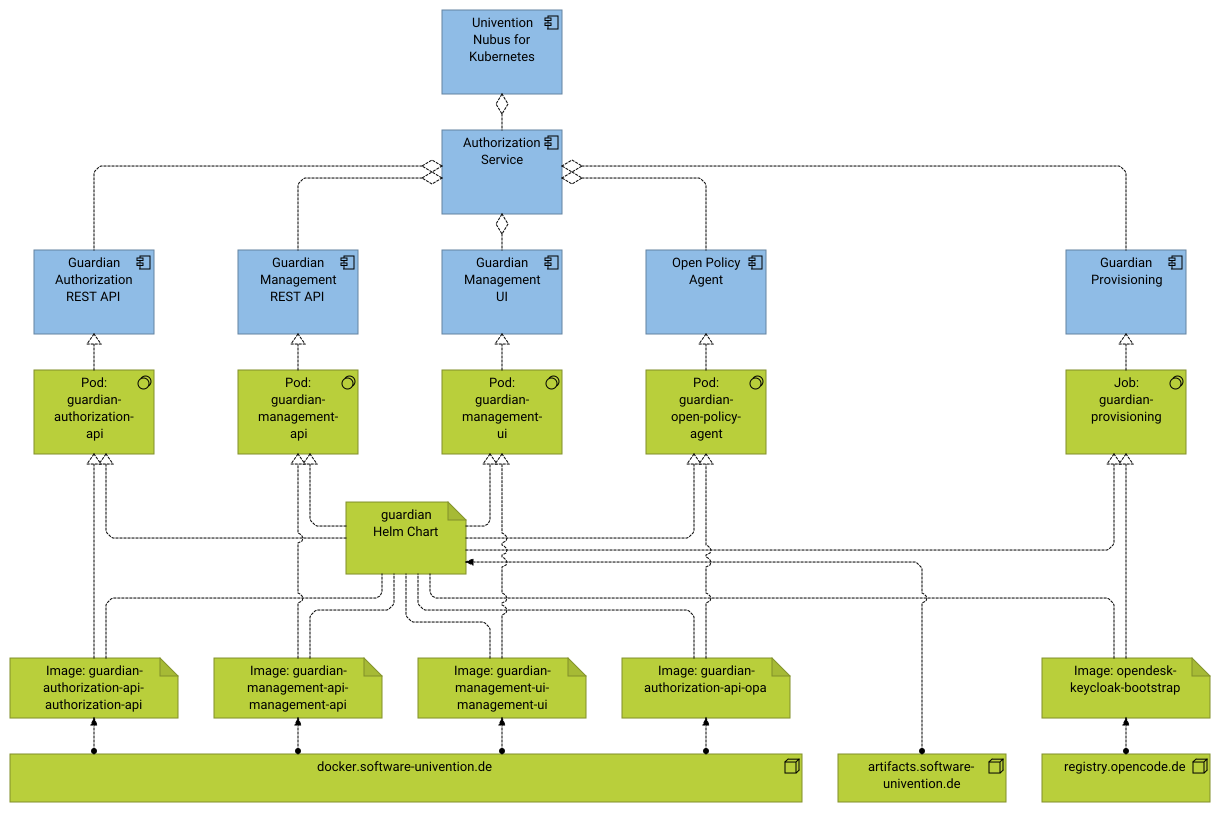
Fig. 2.27 Architecture view for deployment of functional component Authorization Service#
See also
- Authorization Service in interfaces and protocols section
for information about incoming and outgoing interfaces.
- Authorization Service in components section
for information about internal components and behavior.
2.5.3. Directory Manager#
Fig. 2.28 shows the deployment view for the Directory Manager. For a description of the Directory Manager, refer to Directory Manager.
- Helm Charts
From
artifacts.software-univention.de:udm-rest-api- Images
From
artifacts.software-univention.de:udm-rest-api- Pods
udm-rest-api
The pod runs the UDM HTTP REST API, which makes up the Directory Manager functional component.
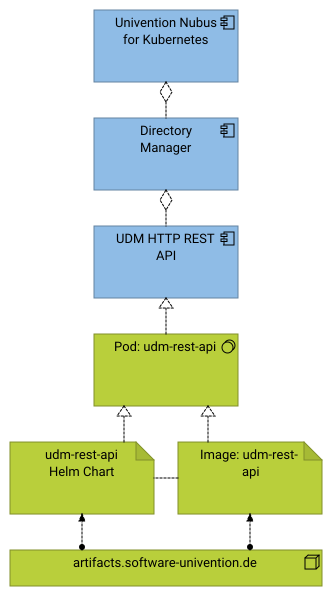
Fig. 2.28 Architecture view for deployment of functional component Directory Manager#
See also
- Directory Manager in interfaces and protocols section
for information about incoming and outgoing interfaces.
- Directory Manager in components section
for information about internal components and behavior.
2.5.4. End User Self Service#
Fig. 2.29 shows the deployment view of the End User Self Service. For a description of the End User Self Service, refer to End User Self Service.
- Helm Charts
From
artifacts.software-univention.de:self-service-listener- Images
From
artifacts.software-univention.de:self-service-invitation- Pods
self-service-listenerThe pod runs the Self Service Consumer component in the End User Self Service functional component.
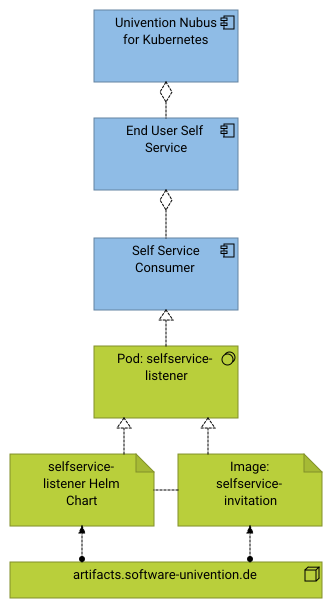
Fig. 2.29 Architecture view for deployment of functional component Self Service#
See also
- Identity Provider in interfaces and protocols section
for information about incoming and outgoing interfaces.
- Identity Provider in components section
for information about internal components and behavior.
2.5.5. Identity Provider#
Fig. 2.30 shows the deployment view of the Identity Provider. For a description of the Identity Provider, refer to Identity Provider.
- Helm Charts
From
artifacts.software-univention.de:keycloakkeycloak-bootstrapkeycloak-extensions
- Images
From
artifacts.software-univention.de:keycloak-bootstrapkeycloak-handlerkeycloak-proxy
From
docker.software-univention.de:keycloak-keycloak
- Jobs
keycloak-bootstrap- Pods
keycloakkeycloak-handlerkeycloak-proxy
The pods run the respective components that make up the Identity Provider functional component. The Keycloak Handler and the Keycloak Proxy together form the Keycloak Extensions component.
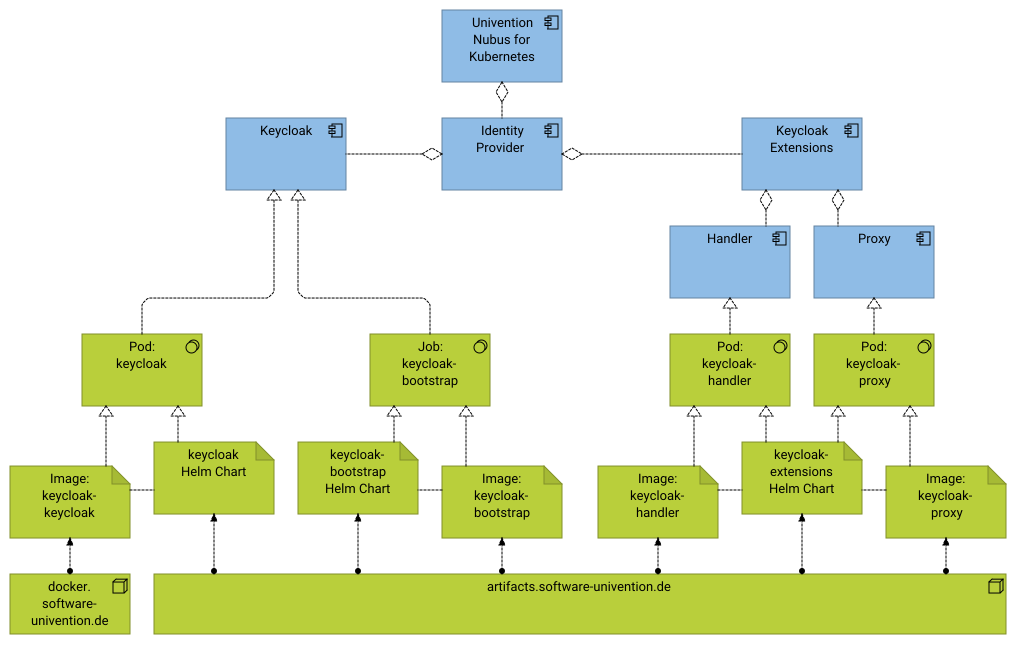
Fig. 2.30 Architecture view for deployment of functional component Identity Provider#
See also
- Identity Provider in interfaces and protocols section
for information about incoming and outgoing interfaces.
- Identity Provider in components section
for information about internal components and behavior.
2.5.6. Identity Store and Directory Service#
Fig. 2.31 shows the deployment view of the Identity Store and Directory Service. For a description of the Identity Store and Directory Service, refer to Identity Store and Directory Service.
- Helm Charts
From
artifacts.software-univention.de:ldap-notifierldap-server
- Images
From
artifacts.software-univention.de:ldap-notifierldap-server
- Pods
ldap-notifierldap-server-primaryldap-server-secondaryldap-server-proxy
The pods run the respective components that make up the Identity Store and Directory Service functional component. Nubus for Kubernetes launches multiple pods.
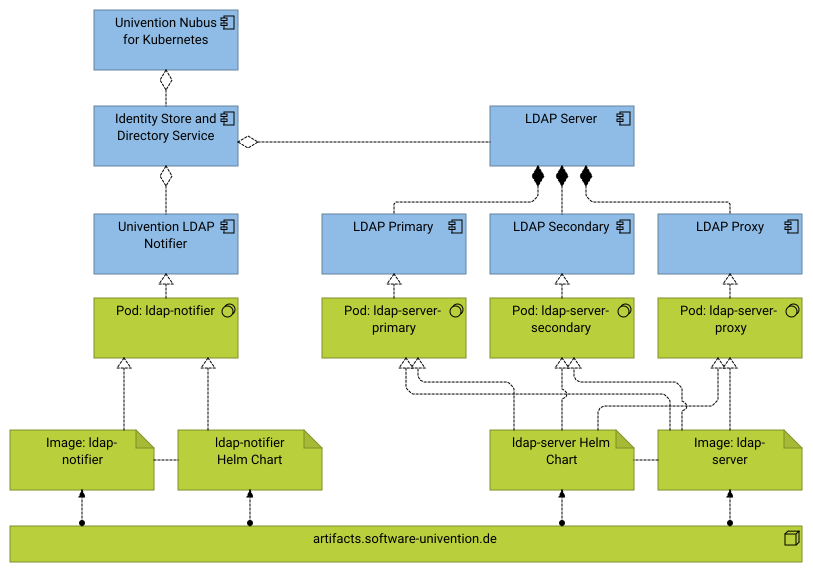
Fig. 2.31 Architecture view for deployment of functional component Identity Store and Directory Service#
Fig. 2.32 shows jobs that load data through the UDM HTTP REST API to the LDAP Server.
- Helm Charts
From
artifacts.software-univention.de:stack-data-umsstack-data-swp
- Images
From
artifacts.software-univention.de:data-loader- Jobs
stack-data-umsstack-data-swp
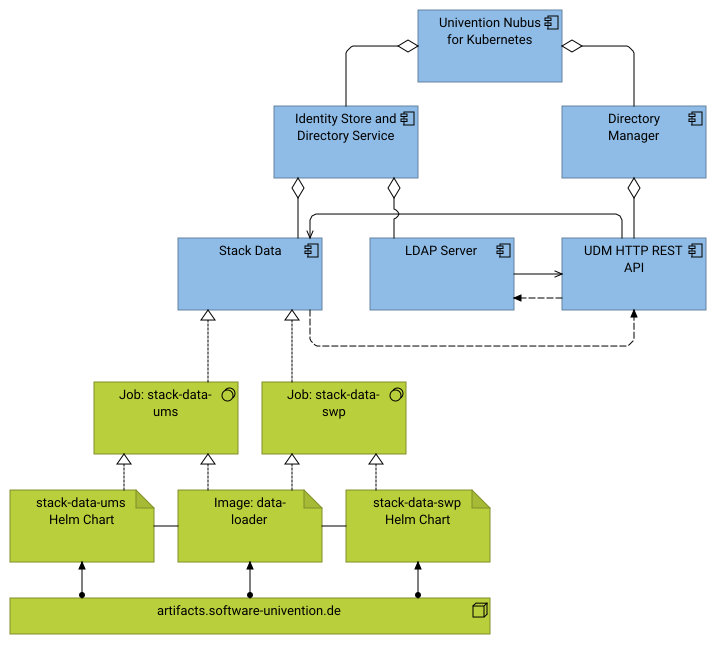
Fig. 2.32 Architecture view for deployment of Stack Data to fill the Directory Service with initial data#
See also
- Identity Store and Directory Service in interfaces and protocols section
for information about incoming and outgoing interfaces.
- Identity Store and Directory Service in components section
for information about internal components and behavior.
2.5.7. Management UI#
Fig. 2.33 shows the deployment view of the Management UI. For a description of the Management UI, refer to Management UI.
- Helm Charts
From
artifacts.software-univention.de:umc-gatewayumc-server
- Images
From
artifacts.software-univention.de:umc-gatewayumc-server
From
docker.io:memcached
- Pods
umc-gatewayumc-serverumc-server-memcached
The pods run the respective components that make up the Management UI functional component.
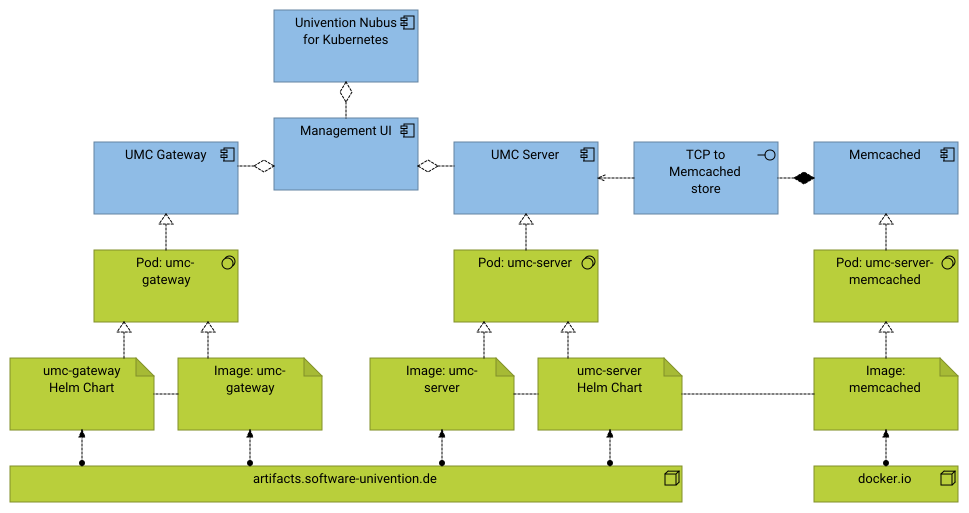
Fig. 2.33 Architecture view for deployment of functional component Management UI#
2.5.8. Portal Service#
Fig. 2.34 shows the deployment view of the Portal Service. For a description of the Portal Service, refer to Portal Service.
- Helm Charts
From
artifacts.software-univention.de:portal-serverportal-frontendportal-listener
- Images
From
artifacts.software-univention.de:portal-serverportal-frontendportal-listener
- Pods
portal-serverportal-frontendportal-listener
The pods run the respective components that make up the Portal Service functional component.
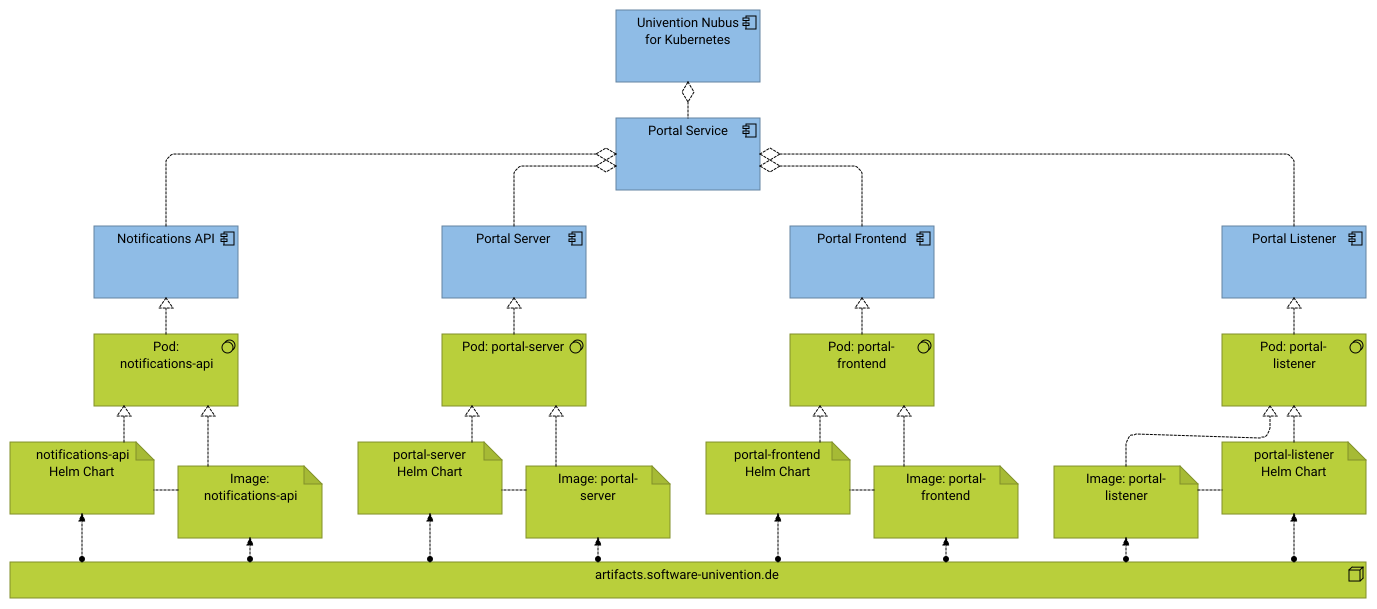
Fig. 2.34 Architecture view for deployment of functional component Portal#
2.5.9. Provisioning Service#
Fig. 2.35 shows the deployment view of the Provisioning Service. For a description of the Provisioning Service, refer to Provisioning Service.
- Helm Charts
From
artifacts.software-univention.de:udm-listenerprovisioning
- Images
From
artifacts.software-univention.de:provisioning-events-and-consumer-apiprovisioning-dispatcherprovisioning-udm-listenerprovisioning-prefillwait-for-dependencyprovisioning-udm-transformer
From
docker.io:natsnats-server-config-reloadernats-box
- Jobs
provisioning-register-consumers- Pods
provisioning-apiprovisioning-dispatcherprovisioning-listenerprovisioning-prefillprovisioning-udm-transformerprovisioning-nats
The pods run the components of the Povisioning Service functional component.
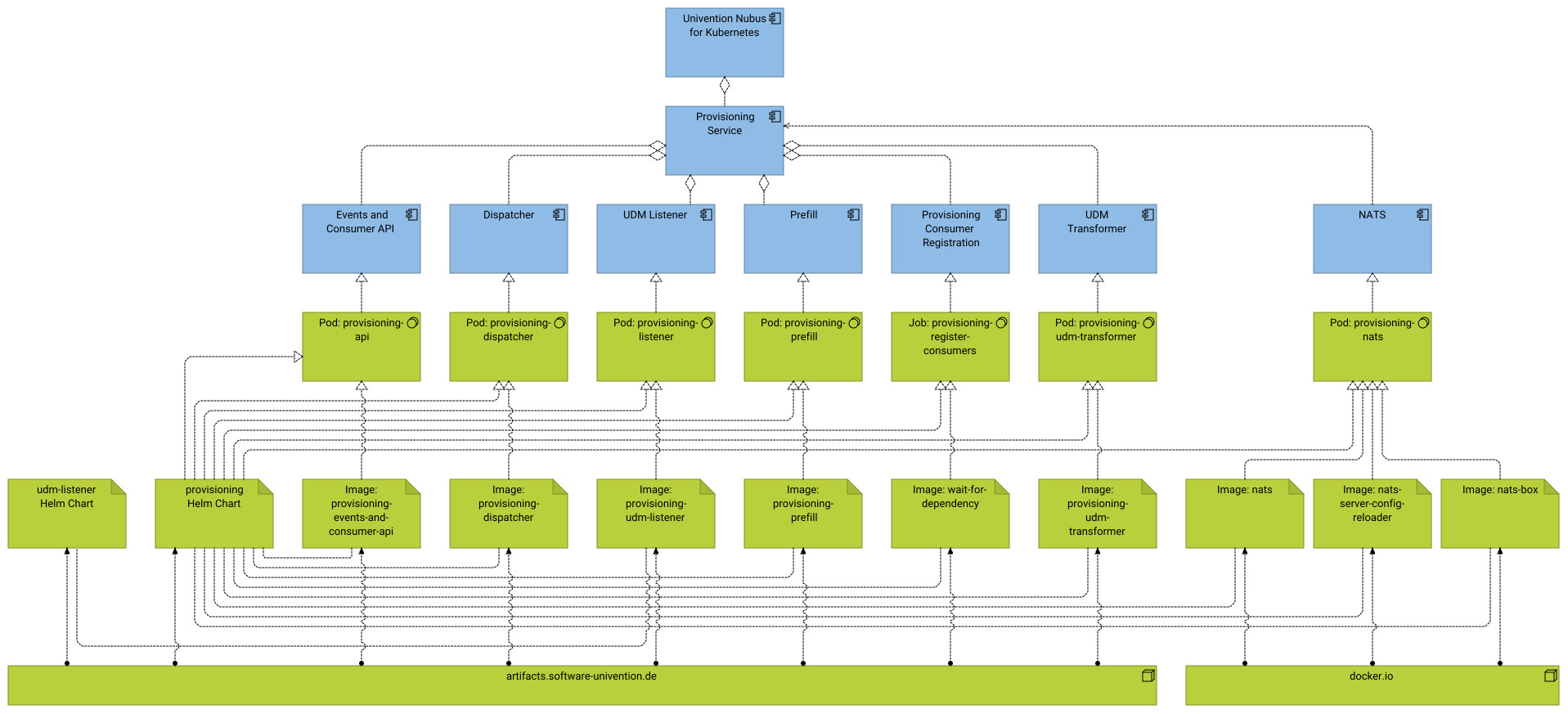
Fig. 2.35 Architecture view for deployment of functional component Provisioning#
2.5.10. 2FA Helpdesk#
Fig. 2.36 shows the deployment view of the 2FA Helpdesk. For a description of the 2FA Helpdesk, refer to 2FA Helpdesk.
- Helm Charts
From
artifacts.software-univention.de:twofa-helpdesk- Images
From
artifacts.software-univention.de:keycloak-bootstrapwait-for-dependencytwofa-helpdesk-backendtwofa-helpdesk-frontend
- Jobs
twofa-helpdesk-provisioning- Pods
twofa-helpdesk-backendtwofa-helpdesk-frontend
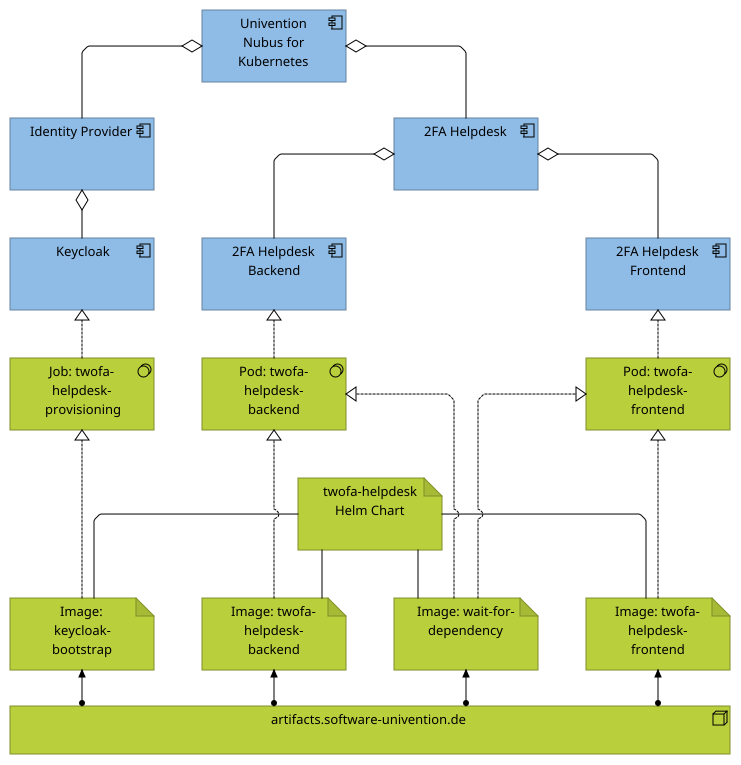
Fig. 2.36 Architecture view of 2FA Helpdesk deployment through Nubus for Kubernetes#
2.5.11. Ingress configuration#
Fig. 2.37 visualizes the Ingress configuration in Nubus for Kubernetes. Ingress exposes HTTP and HTTPS routes from outside the Kubernetes cluster to services within the cluster. It doesn’t cover other protocols, such as LDAP.
In the default configuration, Nubus for Kubernetes uses the following subdomains:
id.global.domainsubdomain used by the Transparent Proxy to Keycloak.portal.global.domainsubdomain used by all other Ingress configurations.
global.domain refers to the domain setting in the deployment file for Nubus in your
Kubernetes cluster.
The Ingress configurations in Nubus for Kubernetes determine where Kubernetes routes the traffic for which URL path. For the details of those routes, consult the Nubus Ingress configuration in your cluster.
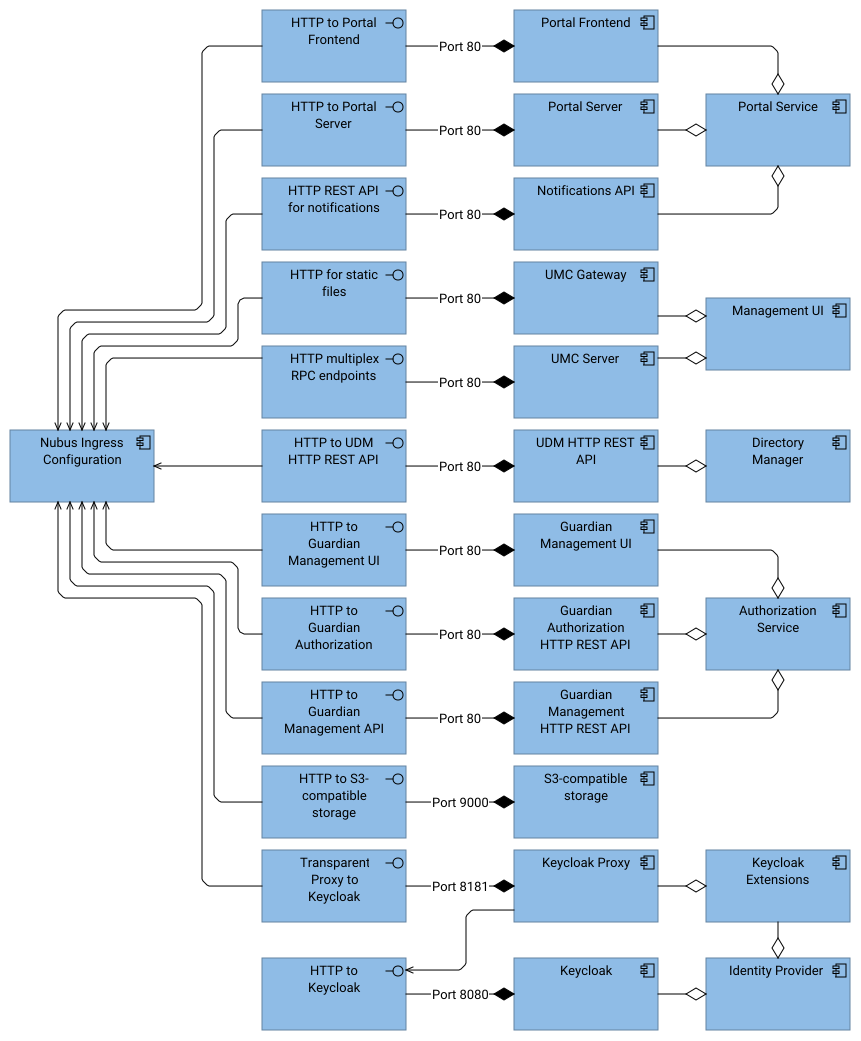
Fig. 2.37 Architecture view for the Ingress configuration#
See also
- Ingress | Kubernetes
for information about the Kubernetes Ingress objects.
global.domainfor information about this setting, see Univention Nubus for Kubernetes - Operation Manual [1].
2.5.12. SQL database: PostgreSQL#
Important
This section is only for your information and applies for Nubus for Kubernetes environments that use the PostgreSQL deployment provided by the Nubus Helm Chart as described in Deploy dependencies based on examples included in Nubus in Univention Nubus for Kubernetes - Operation Manual [1].
This setup is only for testing purposes.
⚠️ Univention doesn’t provide support for the PostgreSQL deployment within Nubus.
For a production deployment and more information, see Use external PostgreSQL database in Univention Nubus for Kubernetes - Operation Manual [1].
Fig. 2.38 shows the deployment view for SQL Database: PostgreSQL.
- Helm Charts
From
docker.io:postgresql- Images
From
docker.io:postgresql- Pods
postgresqlThe pod runs a PostgreSQL database management system. For each application that uses PostgreSQL, the deployment setup creates corresponding databases with corresponding database users and credentials. The figure shows which component uses each database and that the components access the database management system through the TCP to SQL database interface.
The figure shows the direct dependencies between the components and the databases. Table 2.1 shows the direct mappings between databases and components.
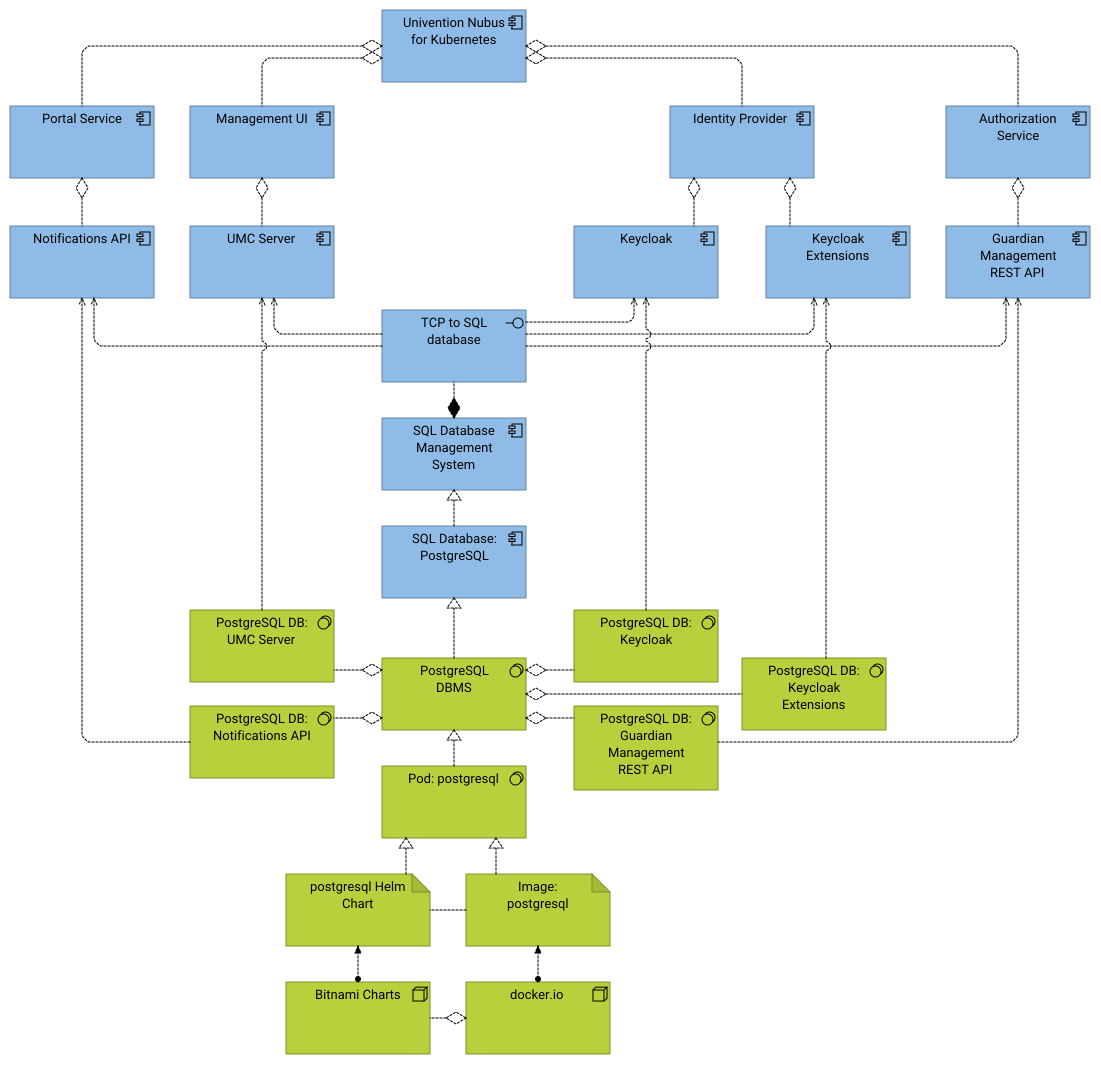
Fig. 2.38 Architecture view of PostgreSQL deployment through Nubus for Kubernetes#
Database |
Component |
Functional component |
|---|---|---|
PostgreSQL DB: UMC Server |
UMC Server |
Management UI |
PostgreSQL DB: Keycloak |
Keycloak |
Identity Provider |
PostgreSQL DB: Keycloak Extensions |
Keycloak Extensions |
Identity Provider |
PostgreSQL DB: Guardian Management REST API |
Guardian Management REST API |
Authorization Service |