
6.2. For Nubus for UCS#
The OX Connector app architecture includes the following elements:
The Nubus for UCS operating environment includes the App Center and Docker Engine. A container runs OX Connector.
The container image contains the OX Connector software.
The OpenLDAP directory in Nubus for UCS is the identity management source for OX App Suite.
Before you continue reading, ensure you know Shared architecture.
6.2.1. Overview#
The OX Connector uses the software in its container image to provision identity data from Nubus for UCS to OX App Suite. The OX Connector connects to the OX App Suite SOAP API. It creates, updates, or deletes OX App Suite objects, including users, groups, contexts, and resources, in response to relevant LDAP directory changes. Fig. 6.4 shows the following components, their boundaries, and dependencies:
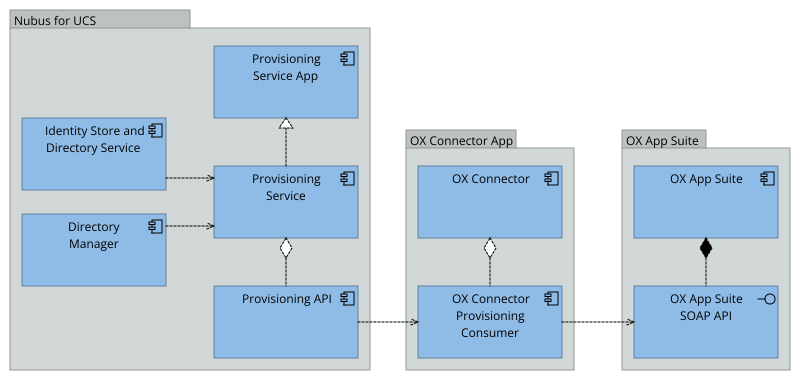
Fig. 6.1 OX Connector app architecture#
Detailed OX Connector app processing, click to open.
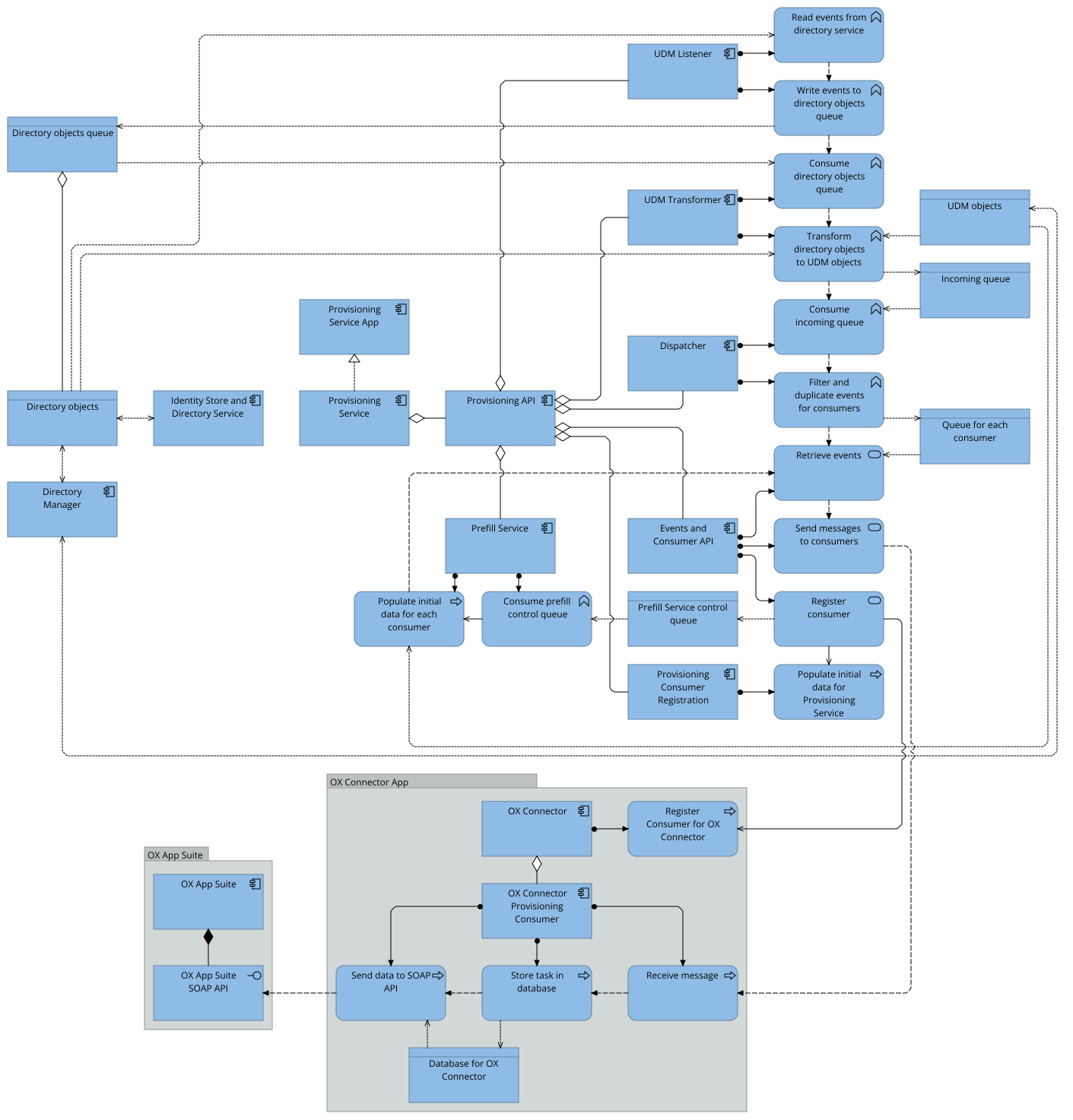
6.2.2. How the connector works#
Univention Directory Manager (UDM) is an object layer on top of the LDAP directory in UCS. The OX Connector reacts to changes in the following UDM modules:
Source modules:
users/usergroups/group
Connector-specific modules:
oxmail/oxcontextoxresources/oxresourcesoxmail/accessprofileoxmail/functional_accountoxmail/shared_accountoxmail/shared_account_permission
The connector processes changes to these modules and sends data to the SOAP API in OX App Suite when required.
6.2.2.1. Access profiles#
When the oxmail/accessprofile UDM module changes,
the connector rewrites the local file
/var/lib/univention-appcenter/apps/ox-connector/data/ModuleAccessDefinitions.properties.
It doesn’t send access-profile data directly to the SOAP API in OX App Suite.
When the connector provisions a user,
it applies the access-profile definitions from this file through the SOAP API.
Administrators can find access profiles in the Management UI, in the LDAP directory module, at .
6.2.2.2. Provisioning#
For a visualization of the provisioning process, see Fig. 6.3. The following steps describe how the OX Connector provisions changed UDM objects to OX App Suite:
The Provisioning Service detects a change in the Identity Store and Directory Service and sends a message with the UDM object through the Provisioning API.
In the container, the OX Connector Provisioning Consumer receives the message and stores it as a task in its SQLite database.
The OX Connector Provisioning Consumer processes tasks in a fixed module order and sends the data for each task to the SOAP API in OX App Suite.
After the SOAP API successfully processes the data, the OX Connector Provisioning Consumer stores the object state in its database of old entries. For more information, see Database of stored object state.
After a connection error, the connector stops processing tasks and retries later. For other errors, it moves the task to the morgue.
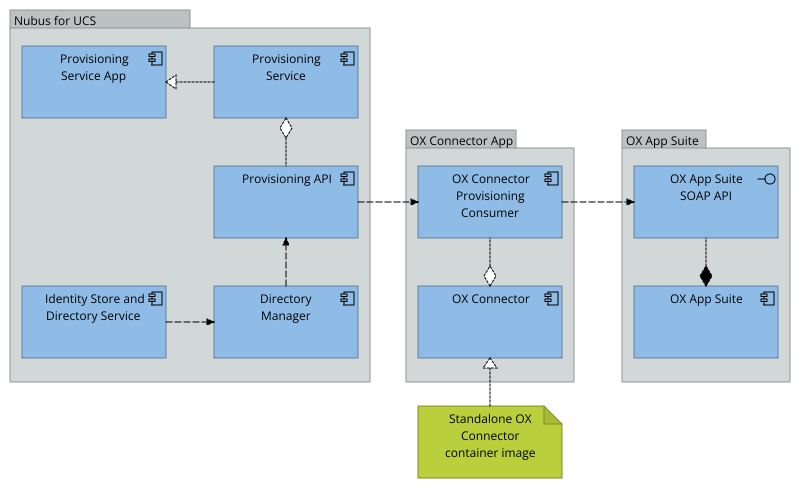
Fig. 6.3 Provisioning procedure#
6.2.3. Provisioned attributes#
For information about configuring the user attribute mapping, see User attribute mapping.
For the related group, context, and resource provisioning implementations, see the following files:
univention-ox-provisioning/univention/ox/provisioning/groups.pyunivention-ox-provisioning/univention/ox/provisioning/contexts.pyunivention-ox-provisioning/univention/ox/provisioning/resources.py
6.2.4. Database of stored object state#
Added in version 3.0.0.
The OX Connector stores its database file at
/var/lib/univention-appcenter/apps/ox-connector/data/ox-connector.db.
The database contains a table named old.
Don’t modify the database file directly.
Listing 6.1 shows how to inspect pending tasks on the Nubus for UCS system. The command displays a summary of the pending tasks.
For more information about provisioning tasks, see Manage provisioning tasks.
$ univention-app shell ox-connector \
  python3 -m univention.ox.provisioning.db summarize-tasks