
1. Introduction#
Welcome to the Operation Manual for Nubus for Univention Corporate Server (UCS).
This manual targets technical administrators who operate UCS domains and systems. It assumes familiarity with Linux system administration, networking concepts, and directory services such as LDAP.
This manual covers the following topics: domain infrastructure, management interfaces, software lifecycle, identity and access management, and system administration. Each chapter includes conceptual overviews and task-oriented procedures.
For installation procedures, see the System deployment chapter. For architectural concepts and design decisions, see Univention Corporate Server 5.2 Architecture [1].
1.1. Understanding Nubus and UCS#
This section explains what Nubus and UCS are, how they relate to each other, and what capabilities they provide when deployed together.
1.1.1. What is Nubus?#
Univention Nubus is an open-source solution for identity and access management. It provides a portal as the central entry point for end users and provides the following core capabilities:
Administration of users and groups across your organization.
User self-service capabilities through the portal.
Integration interfaces that connect various applications to the identity system.
Single sign-on across integrated applications.
Nubus consolidates identity management and application access into one system. Built-in integrations connect third-party applications to the identity management system, eliminating the need for separate authentication systems.
Nubus runs on different platforms. This manual covers Nubus for Univention Corporate Server. For Nubus on Kubernetes, see Nubus for Kubernetes - Operation Manual 1.x [2].
1.1.2. What is UCS?#
Univention Corporate Server (UCS) is a Linux-based server operating system that serves as the platform for deploying Nubus. UCS provides the infrastructure layer on which Nubus runs.
Nubus for UCS provides two layers of functionality. Nubus covers the core identity and access management capabilities, and UCS adds the broader infrastructure services:
Network services for DHCP and DNS administration.
File and print services.
Computer administration and monitoring.
Mail services.
Univention App Center for installing additional applications and extensions.
Services for integrating or replacing existing Microsoft Active Directory domains.
1.1.3. How Nubus and UCS work together#
Nubus for UCS uses a unified administration model. All components operate in a shared security and trust context—the Nubus for UCS domain. UCS combines Nubus and the infrastructure services through the Management UI, a unified web interface for managing the system across distributed and virtualized environments.
Nubus for UCS includes extensive interfaces to infrastructure components and management tools from third-party vendors, so you can integrate it with existing environments.
You can find details on each of these components throughout this manual.
1.2. Key concepts#
The following concepts are central to how Nubus for UCS operates. Each section provides a brief overview. For detailed information, see the referenced chapters.
1.2.1. Domain concept#
Nubus for UCS manages your IT infrastructure within a common security and trust context called the Nubus for UCS domain. The domain contains all servers, clients, and users. During installation, you assign each Nubus for UCS system a server role. Fig. 1.1 illustrates a domain concept across multiple locations with different system roles.
For detailed information on system roles, domain join procedures, and client integration, see Domain infrastructure.
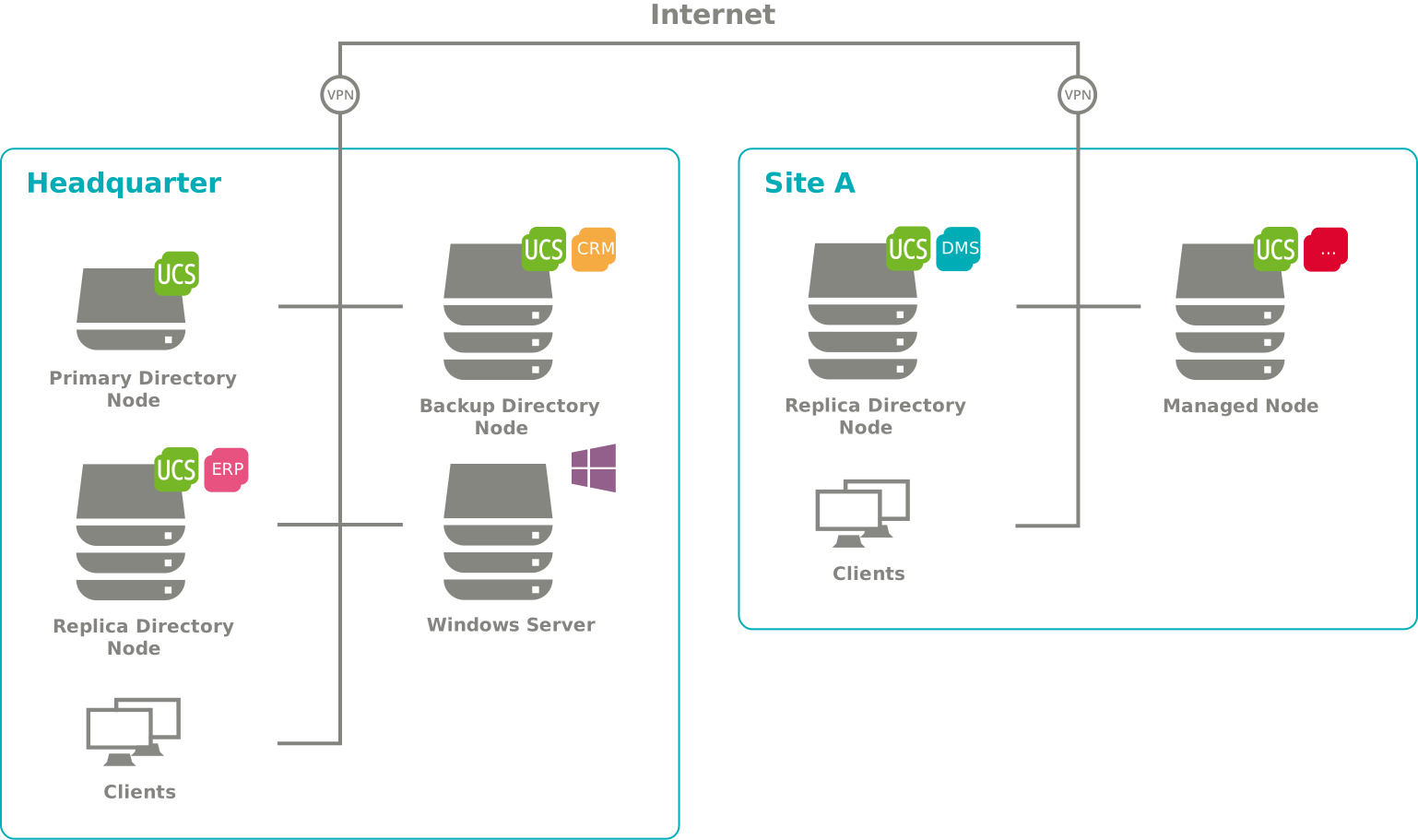
Fig. 1.1 Nubus for UCS domain concept#
1.2.2. Management UI#
The Management UI provides web-based access to the LDAP directory through management modules. You can use management modules to display, edit, delete, and search data in the LDAP directory. The web interface provides wizards for administering users, groups, networks, computers, directory shares, and printers. For an overview of the available modules, see Fig. 1.2.
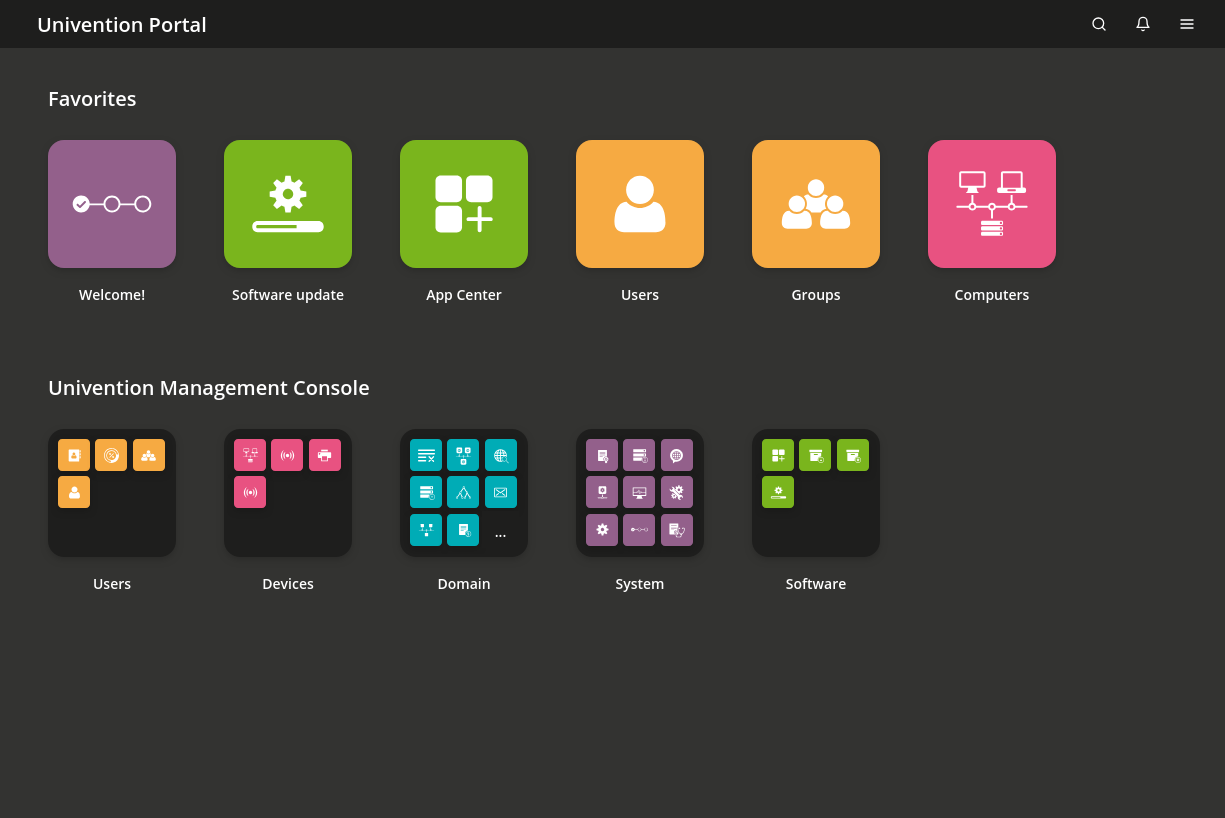
Fig. 1.2 Management modules in the Management UI#
For command-line administration, Univention Directory Manager lets you perform domain-wide administrative tasks through scripts or automated processes. Management modules also let you configure individual computers, including software installation and service monitoring.
For detailed information about the Management UI and UDM commands, see Management interface.
1.2.3. LDAP directory service#
An LDAP directory stores the data you need across the domain, including user accounts and service configurations such as DHCP. Central data management in the LDAP directory eliminates duplicate data entry and reduces errors and inconsistencies.
For detailed information about LDAP schema management, replication topology, and directory node roles, see LDAP directory service.
1.2.4. Policy concept#
LDAP directories have a hierarchical structure. Objects such as users and computers exist in containers, and containers can contain other containers. The root container forms the LDAP base object.
Policies describe settings that apply to multiple objects. When you link policies to containers, they apply to all objects in that container and its subcontainers, without requiring you to configure each object individually.
Nubus for UCS uses policies for various administrative tasks, including:
Maintenance policies that control when systems install or remove packages, see Package maintenance policy.
Password policies that enforce security requirements for user accounts, see Password policies.
Repository server policies that specify which update server the systems use, see Policy-based configuration of the repository server.
For information about creating and managing policies, see Policies module in Nubus Manual 1.x [3].
1.2.5. Univention App Center#
Univention App Center is a centralized platform for discovering, installing, and managing applications in your Nubus for UCS domain. It handles the complete application lifecycle—from installation and configuration to updates and removal—for both traditional packages and Docker applications.
The chapter Univention App Center covers App Center installation and management in detail.
1.2.6. Listener/notifier replication#
The listener/notifier mechanism propagates changes across the domain. When you create, edit, or delete entries in the LDAP directory, the mechanism triggers defined actions on the affected computers. For example, when you create a directory share, the mechanism updates the NFS and Samba configuration files and creates the directory on the selected server.
You can extend the listener/notifier mechanism with custom modules to integrate third-party products with the LDAP directory service.
For detailed information about the listener/notifier mechanism, see Domain replication with Listener and Notifier.
1.3. Feedback#
Your feedback on this documentation is welcome. If you have any comments, suggestions, or corrections, submit your feedback to improve the document.